
Architecture overview
Before starting installation, you should read the following section to better understand architecture and features offer by Janua-SMS.
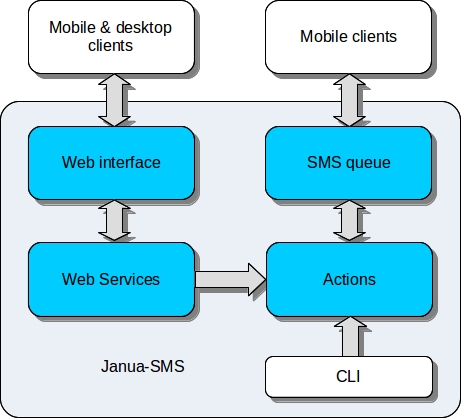
- Description:
- Web interface: ExtJS web interface for Janua-SMS management
- Web services: web services and Rest API
- SMS queue: Send/Receive persistent SMS queue
- Actions
What does action mean here ?
It’s the heart of Janua-SMS, the term active in “active SMS gateway” came from here.
- An action contains functions which can be exposed to three contexts:
- SMS
- WEB
- CLI (Command Line Interface)
So each context can trigger and execute it’s own function.
Here what you can do by writing your own actions:
- trigger execution based on a specific keyword in received SMS
- trigger execution based on encoded SMS with specific parameters (see Janua-Client)
- create a new command for command line interface (option switch action)
- create a new web service by using GET or POST methods (create a web service)